CNBC: Business & Stock News
- 4.5
- Rating
- 5.00M
- Installs
- Free
- Price

 Analysis by App-foxy
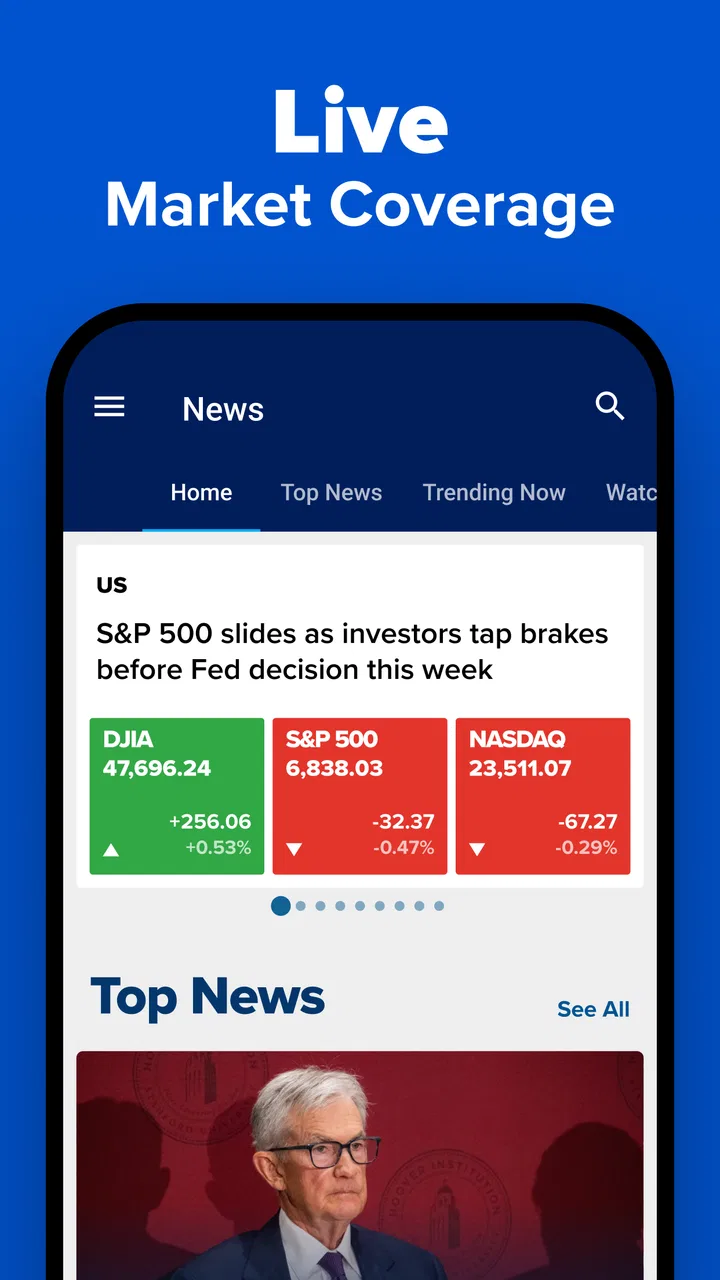
I use CNBC: Business & Stock News when I want to understand what is moving markets without opening a full desktop terminal. It is a finance app from Versant Media, LLC, built around business news and real-time financial market coverage. My experience with it is less about replacing a professional trading platform and more about having a practical market window in my pocket: useful during a commute, before a meeting, or when a company suddenly becomes part of the conversation.
The app is free to download and is rated for Everyone, which makes it approachable for casual readers as well as people who already follow stocks closely. Its 4.5 average from around 104 thousand ratings and more than 5 million installs suggest that it has become a familiar choice for mobile finance readers. I can see why, although the experience depends heavily on a reliable connection and on how much information I actually need at a given moment.
How CNBC feels when the network is doing the work
The strongest part of the experience appears when I have a stable internet connection and the market is active. Headlines can be checked quickly, market coverage feels timely, and the app gives me a way to move from a broad business story toward the financial angle behind it. That matters because a stock quote alone rarely explains why a price is changing. News adds the context: an earnings announcement, an industry development, a management decision, or a wider economic concern.
You May Also Like

 Blood Strike: 2.5 Anniversary
Blood Strike’s Loadouts Turn Every Drop Into a Tactical Gamble
A close look at Blood Strike’s custom loadouts: how fast access to signature weapons reshapes its battle royale rhythm, rewards preparation, and narrows the gap between fights.

 Pandora - Music & Podcasts
Pandora’s Music Is Easy to Start, but Harder to Recover
Pandora’s strength is its low-effort path from a seed to a station. Its weak spot is how much confidence it asks you to place in connection, setup, and quiet recovery.

 8 Ball Pool
 Is Built on Rivalries, Rematches, and Routine
A close look at the rivalries, rematches, shared routines, and unanswered safety questions that turn a quick pool match into a persistent mobile community.

 Samsung Music
’s Quiet Strength Is Playing What You Already Own
Its reach comes less from spectacle than from dependable access to a personal library. That simplicity is both the app’s strongest retention engine and its ceiling.

 AccuWeather: Weather Radar
AccuWeather Review: A Quick, Clear Forecast for Everyday Decisions
For everyday plans, the best forecast is the one you can understand quickly. AccuWeather makes rain timing, radar, and local conditions easy to act on, with a few trade-offs.

 Hill Climb Racing
Why Hill Climb Racing Still Turns Crashes Into One More Run
A tiny car, a bumpy hill and one more upgrade: Hill Climb Racing keeps resurfacing because its simple chaos makes every near-miss feel personal.
More From Our News Desk



I would not treat every headline as a trading signal. Instead, I use the app as a first pass. If a company I follow suddenly appears in the news, I can read the report, check the related market information, and decide whether the story deserves deeper research elsewhere. The most useful habit is to use CNBC as a context tool, not as a substitute for personal investment research.
Connectivity shapes this workflow more than it might seem. On a strong home or office connection, moving between news and market information feels natural. On a crowded public network, the experience can become less predictable: pages may take longer to appear, current information may not refresh immediately, and a reader can lose patience when trying to follow a fast-moving story. For financial content, that delay is not merely cosmetic. It changes how confidently I interpret what I am seeing.
This is especially important during major market events. When prices are moving quickly, I want to know whether I am looking at the latest available information or an earlier screen state. I therefore avoid making a decision based on a single glance. I refresh when appropriate, compare the timing of the article with the market movement, and use a separate brokerage or research service before placing any order. CNBC is valuable in that chain, but it is not the entire chain.
What I do with the app during an ordinary day
A realistic use case is a morning check before work. I open the app with a few minutes available, scan the main business stories, and look for anything that could affect companies or sectors I already care about. I am not trying to read everything. I am looking for changes in tone and subjects that might matter later in the day. That makes the app more useful than an endless stream of unrelated financial posts because the focus stays on business and markets.
Later, if a colleague mentions a company or an economic story, I can use the app to get oriented without searching the entire web. This is where the recognizable CNBC editorial identity helps. The app is designed for people who want business coverage in a compact mobile format, rather than a collection of anonymous market snippets.
On the other hand, it is not my first choice for building a detailed valuation model, comparing several years of financial statements, or managing an investment portfolio. A brokerage app is better for orders and account information. A dedicated research platform is usually better for deep screening and structured analysis. CNBC sits between those options: broader and more readable than a quote-only tool, but less specialized than a terminal or serious portfolio workstation.
Using it on mobile without turning every break into market watching
The phone format suits short sessions. I can check a headline while waiting for an appointment, read a business story during a lunch break, or review market developments before a conversation. The app works best when I give each visit a purpose. A quick headline scan is manageable; repeatedly checking every small market movement can become distracting and may encourage emotional reactions.
I also find that screen size changes how I read. On a phone, I prefer to begin with the headline and opening paragraphs, then continue only when the subject is genuinely relevant. Long articles are easier to handle when I am stationary and connected to a dependable network. In a moving or noisy environment, the app is better for orientation than for careful analysis.
For people who follow several companies, a simple routine helps. I start with broad business news, identify the stories connected to my interests, and only then spend time on individual market information. This avoids a common mobile mistake: jumping straight to a price change without understanding the event behind it. The app’s value increases when I use it to narrow attention rather than multiply it.
Another practical point is that mobile access can tempt me to read at the wrong moment. If I am driving, handling money, or in a meeting, the app should wait. Financial news is rarely improved by hurried reading. I would rather review one relevant article carefully on a stable connection than skim several screens while distracted.
What happens when the connection is weak or interrupted
The app’s dependence on current online content is the main limitation I notice. News and market coverage are time-sensitive, so a weak connection affects more than convenience. A delayed screen can make a fresh story look old, while a partially loaded page can interrupt the flow between an article and the related market information.
When the network becomes unreliable, I stop treating the app as a live market monitor. I may read whatever has already appeared, but I avoid drawing conclusions from incomplete loading or assuming that a displayed figure reflects the current moment. If I need a dependable transaction status or account balance, I go directly to my financial provider instead.
Recovery is fairly simple as a user habit, even though it is not always instant. I move to a stronger connection, reopen the relevant section, and check the article time before continuing. If a story is important, I verify that the page has fully loaded rather than relying on a notification or a headline seen briefly. This is a small discipline, but it prevents a common error: confusing an alert about news with confirmation of what the market is doing now.
I also recommend keeping expectations realistic after reconnecting. A restored connection does not automatically make every earlier interpretation correct. If the market moved while the phone was offline or struggling, I reassess the whole situation instead of simply accepting the first number I see. For time-sensitive finance, recovery means rechecking context, not merely waiting for the screen to refresh.
This is one area where a conventional brokerage app can be preferable. If my immediate concern is an order, account balance, or portfolio position, I want the service that owns that information. CNBC can help explain the environment around a move, but it should not be used as the authority for account actions or execution.
Reading responsibly when mobile data matters
I am careful with data usage because financial coverage can involve repeated article openings, refreshed market information, images, and video-oriented material. My approach is to use a trusted Wi-Fi connection for longer reading and reserve mobile data for short checks when I am away from home. That is not because every session is necessarily heavy, but because frequent refreshing can add up over a day.
A data-conscious workflow also improves attention. Instead of repeatedly reopening the same screen, I check the main headlines once, choose the stories that matter, and leave the app. If I am following a developing event, I return at deliberate intervals rather than refreshing continuously. This reduces both unnecessary network use and the temptation to respond to every small movement.
People with limited data plans should be especially selective about how they consume rich financial coverage. Reading a short update and checking the key market context may be enough for a quick session. Longer viewing is better saved for a stable connection. I would also avoid assuming that a page saved in memory represents a current market state; cached-looking content should never be treated as live confirmation.
There is a trade-off here. The app’s appeal comes from current business information, but current information requires communication with online services. A reader who wants a completely self-contained reference for offline use may find this type of finance app frustrating. CNBC makes more sense for someone who values timely access and accepts that connectivity is part of the experience.
Who gets the most from CNBC
I recommend it to readers who want a recognizable source for business news, market developments, and financial context in one mobile destination. It is particularly suitable for investors who already have a brokerage account but want a broader view before researching a decision. It also works for students, professionals, and curious readers who want to understand why a company or sector is receiving attention.
It is less suitable for someone looking for a pure budgeting tool, a personal finance planner, or a complete trading workspace. The app’s finance category should not be mistaken for account management. It is about coverage and market awareness, not replacing every financial service on a phone.
New investors should also use it with some restraint. The amount of business information can create the impression that every headline requires action. In my experience, the better use is educational: notice how news affects market conversations, learn which events repeatedly matter to companies, and then verify details through more specialized sources.
Experienced market followers may appreciate the speed and breadth, but they may still want a separate tool for advanced charting, screening, alerts, or portfolio analytics. CNBC can begin the investigation, while another service completes it. That division of labor is not a weakness; it is simply a clearer way to use the app.
Value, purchases, and the overall fit
Because the app is free, it is easy to try without committing money at the start. There are in-app purchases ranging from $14.99 to $399.99 per item, so I would review any upgrade carefully and decide whether the additional access matches my actual reading habits. Casual users may be satisfied with the basic experience, while people who rely on financial coverage more frequently may consider paid options depending on what they need.
I would not pay simply because a market day feels urgent. First, I would use the free experience across several ordinary days, test whether the coverage fits my interests, and identify the exact limitation that a purchase is meant to solve. That approach is especially important in finance, where buying more information does not automatically produce better decisions.
The app has been available since March 18, 2010, and that long presence helps explain why it feels like an established mobile destination rather than a temporary news experiment. Still, longevity does not remove the need for judgment. Business coverage can be useful, but every article has to be interpreted alongside company filings, official announcements, market conditions, and my own risk tolerance.
My final view is positive, with a clear condition: I want a reliable connection and a defined reason for opening it. CNBC: Business & Stock News is strongest as a connected, mobile briefing for business and markets. It gives me useful context faster than searching from scratch, and it is more informative than watching prices without explanations. But it is not the right choice for offline-first reading, detailed portfolio management, or making trades directly from a news-driven impulse.
If you want a free finance app from Versant Media, LLC that helps you follow business developments while moving through the day, I think it is worth trying. I would keep a brokerage app for transactions, a research tool for deep analysis, and CNBC for the news layer that connects market movement with the events behind it. Used that way, its network dependence becomes a fair trade for timely coverage rather than an unexpected frustration.
FAQs for CNBC: Business & Stock News
01What features does the CNBC app offer for tracking financial news?
The CNBC app provides users with real-time financial news, stock market updates, and personalized watchlists. It also includes live streaming of CNBC TV, exclusive interviews, and in-depth analysis. Users can customize alerts for breaking news and significant market events, ensuring they stay informed on the latest developments in the financial world.
02Is the CNBC app suitable for beginners in stock trading?
Yes, the CNBC app is suitable for beginners as it offers a user-friendly interface with easy access to essential financial news and stock market data. The app also features educational resources such as articles and videos to help new investors understand market trends and develop their trading strategies. However, it’s important for beginners to supplement this with additional research and learning.
03Can I access international financial news on the CNBC app?
Absolutely, the CNBC app provides comprehensive coverage of global financial markets. Users can access news and updates from major financial hubs around the world, including Europe, Asia, and the Americas. The app offers insights into international stock markets, economies, and key financial events, making it a valuable resource for those interested in global finance.
04Does the CNBC app offer any subscription services?
Yes, the CNBC app offers a premium service called CNBC Pro, which provides subscribers with enhanced features such as live CNBC TV with no ads, access to exclusive Pro articles, and in-depth market analysis. This subscription is ideal for users who require more detailed financial insights and prefer an ad-free experience while using the app.
05How frequently is the information updated on the CNBC app?
The CNBC app updates information in real time, ensuring users receive the latest financial news and stock market data as soon as it becomes available. With its continuous updates, users can rely on the app to provide up-to-date news alerts, market analysis, and stock quotes, allowing them to make informed financial decisions quickly.
Pros
- Real-time stock updates enhance decision-making.
- Comprehensive market news coverage.
- User-friendly interface with intuitive navigation.
- Customizable watchlists for tracking investments.
- In-depth articles and expert analysis available.
Cons
- Frequent ads can disrupt user experience.
- Some features require a subscription.
- Occasional delays in news updates.
- Limited offline content access.
- High data usage for streaming videos.

CNBC: Business & Stock News
Gallery